Wednesday, August 26, 2026
How to Run a Salesforce Permission Audit That Holds Up
Posted by
The question behind every access ticket
"Why can this user see that record?" has four possible answers, and they live in four different places. Most of the time lost in a permission investigation is spent checking them in the wrong order.
The order that works, from cheapest to most expensive to check:
- Field-level security — is the field readable for this profile or any assigned permission set?
- Page layout and record type — the field may be readable and simply absent from this layout.
- Object permissions — Read, Create, Edit, Delete, and the View All / Modify All escape hatches.
- Record access (sharing) — org-wide defaults, role hierarchy, sharing rules, manual and team shares.
Working top-down settles roughly three-quarters of tickets before you ever open sharing settings, which is the layer that takes real time to reason about.
Note:
Effective access is the union of the profile and every assigned permission set. Auditing the profile alone is the single most common way to reach a confident wrong answer.
The quarterly audit, in four passes
Pass 1: who has the dangerous permissions
Start with the system permissions that override everything else. View All Data and Modify All Data make the rest of the audit moot for whoever holds them.
SELECT Id, Name, Username, Profile.Name, IsActive
FROM User
WHERE IsActive = true AND Profile.PermissionsViewAllData = true
ORDER BY Profile.Name
Expect a short list. If it is not short, that finding outranks everything else in the audit.
Pass 2: dormant accounts
Licences and risk both accumulate here. An active user who has not logged in for ninety days is either a leaver nobody deactivated or an integration account mislabelled as a person.
SELECT Id, Name, Username, LastLoginDate, Profile.Name
FROM User
WHERE IsActive = true AND LastLoginDate < LAST_N_DAYS:90
ORDER BY LastLoginDate
Pass 3: profile drift
Cloned profiles are where governance goes to die. "Sales User — EMEA — v2" starts as a copy and diverges one permission at a time, usually without a ticket.
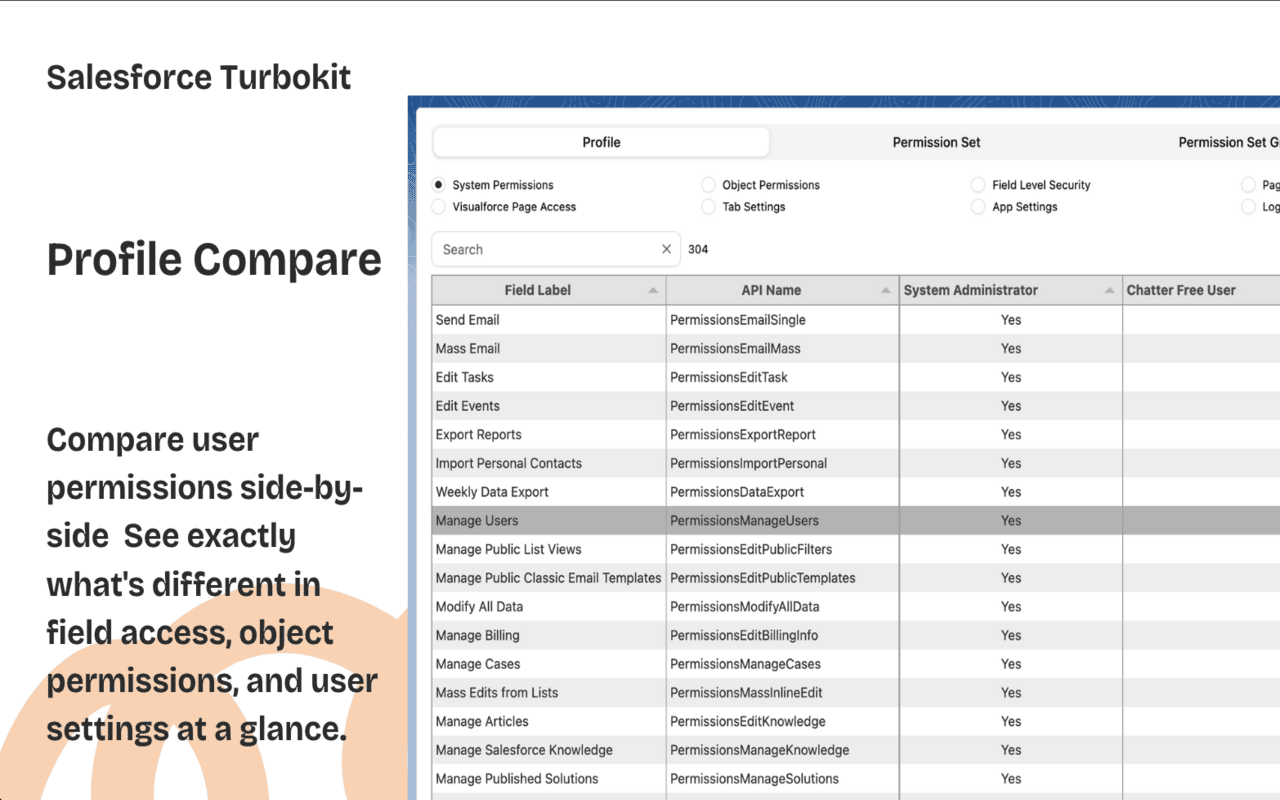
Comparing two profiles natively means opening both in separate tabs and reading down every object. It is an afternoon on a mature org, which is why it does not get done. A side-by-side profile comparison turns it into a few minutes, and the diff is the artifact you attach to the audit.
What to diff, in priority order:
- Object permissions, especially View All and Modify All
- Field-level security on anything regulated — compensation, health, payment data
- System permissions: API Enabled, Manage Users, Export Reports
- Record type and tab visibility, which quietly change what people can create
Pass 4: login reality
Configuration tells you what is possible; login history tells you what happened.
SELECT UserId, LoginTime, SourceIp, Status, LoginType
FROM LoginHistory
WHERE LoginTime = LAST_N_DAYS:30 AND Status != 'Success'
ORDER BY LoginTime DESC
Read it for clusters, not individual rows: repeated failures on one account, logins from countries the business does not operate in, and new LoginType values that mean an integration nobody announced. The login and event monitoring guide covers what each source retains and for how long.
Make the findings survive the meeting
An audit that produces a conversation and no artifact gets re-run from scratch next quarter.
- Export every diff and query result. Date them. They are the before-picture for the next audit.
- Write down why a permission exists, not just that it does. The next admin inherits your reasoning or repeats your investigation.
- Change one thing at a time and re-test with Login As. Batched permission changes are unattributable when something breaks a week later.
- Move new grants to permission sets. Editing a shared profile to solve one person's problem is how the next audit gets its findings.
The standing recommendation
Keep profiles minimal and grant through permission sets. It costs a little more setup and it makes every future audit tractable: a permission set is a named, unassignable-in-one-click unit of access, and a profile is a hundred-object surface nobody can hold in their head.
More on the underlying concepts: permission sets, field-level security, and the admin how-to library.